Overview
Logging in to Courier used to mean creating an access token in the console and piping it in from a file. courier login now runs the OAuth 2.0 device grant (RFC 8628): run the command, approve in the browser, done. I built the client in Courier and the browser pages on Blutui's side.
In the CLI
- A small OAuth package. Courier asks for a device code, shows the user code, then polls the token endpoint. Transport, error vocabulary, polling and orchestration each live in their own file. Every poll error comes back as HTTP 400, so the transport only reports it and the polling loop decides:
authorization_pending means wait, slow_down adds five seconds to the interval for good, and expired_token, access_denied or anything unexpected stops the loop.
- No prefilled link. Courier deliberately opens the plain verification page instead of the URL with the code already filled in. A prefilled link can be sent to someone who is already signed in, and their approval would hand the sender a token. Making you copy the code out of your own terminal blocks that.
- Built for the terminal. The code is copied to your clipboard, except over SSH, where the clipboard belongs to the remote machine. Courier waits for Enter before opening the browser so the code is still on screen, then shows a spinner while it polls.
- Sessions that last. Access tokens are short-lived JWTs. When one expires, Courier trades the refresh token for a new one before running the command, stores the rotated refresh token, and keeps credentials in the OS keyring with a plain-text fallback.
In the browser
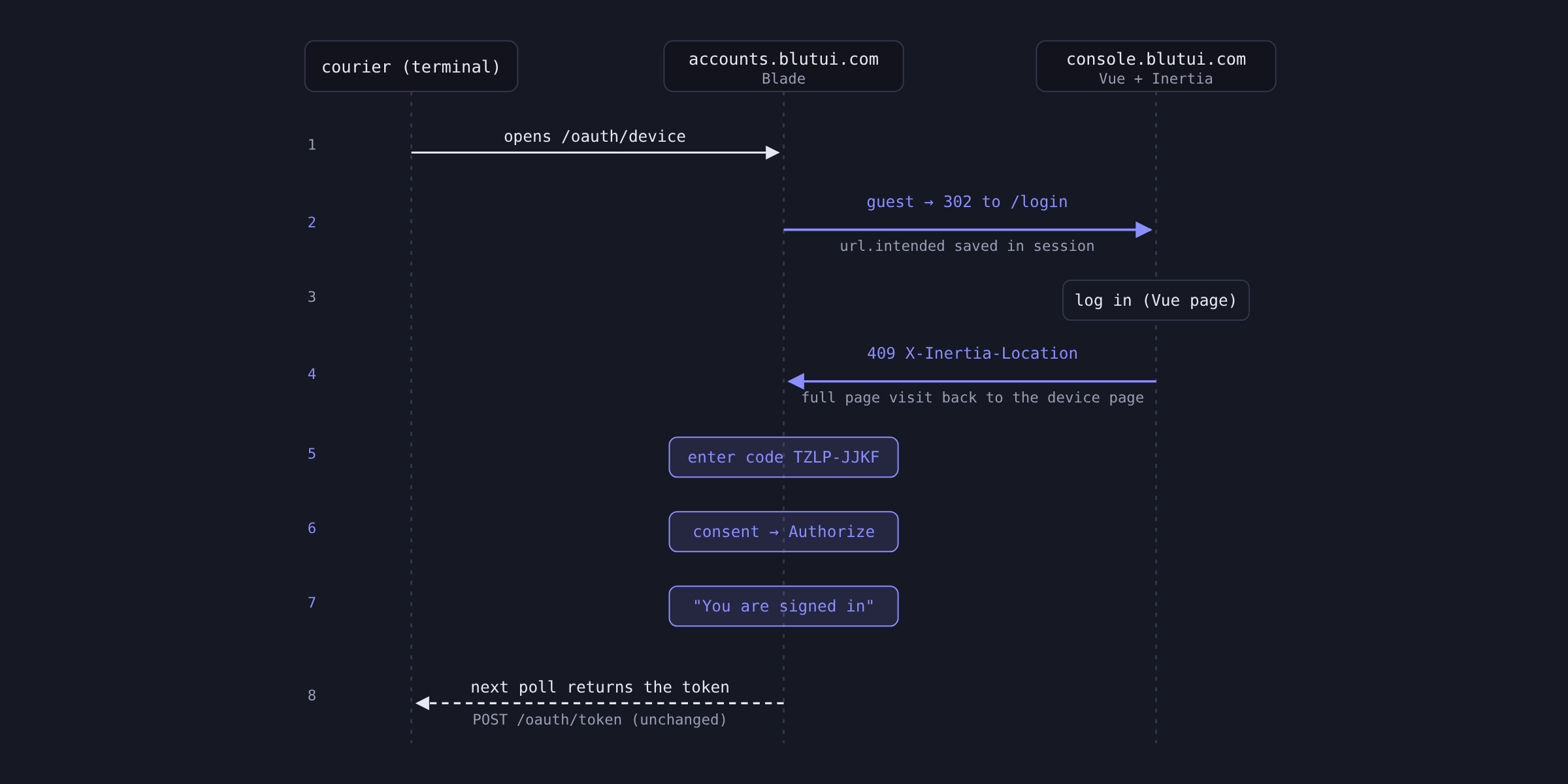
The approval pages are rendered on accounts.blutui.com. Someone who isn't signed in has to cross from one to the other and back without losing their place.
- Login comes first. The code page now requires sign in, so you don't lose the code you typed to a login redirect.
- Getting back after login. Inertia submits the login form as XHR, so a plain
302 to the accounts site was blocked as a cross-origin request. Cross-host destinations now return Inertia's 409 with X-Inertia-Location, which turns into a full page navigation.
- Consent and a real ending. The page with the Authorize button shows the app, the scopes it is asking for, and a warning against approving a login you didn't start. Approving or cancelling now ends on a page that tells you to go back to your terminal.
Email: dionpinto000@gmail.com